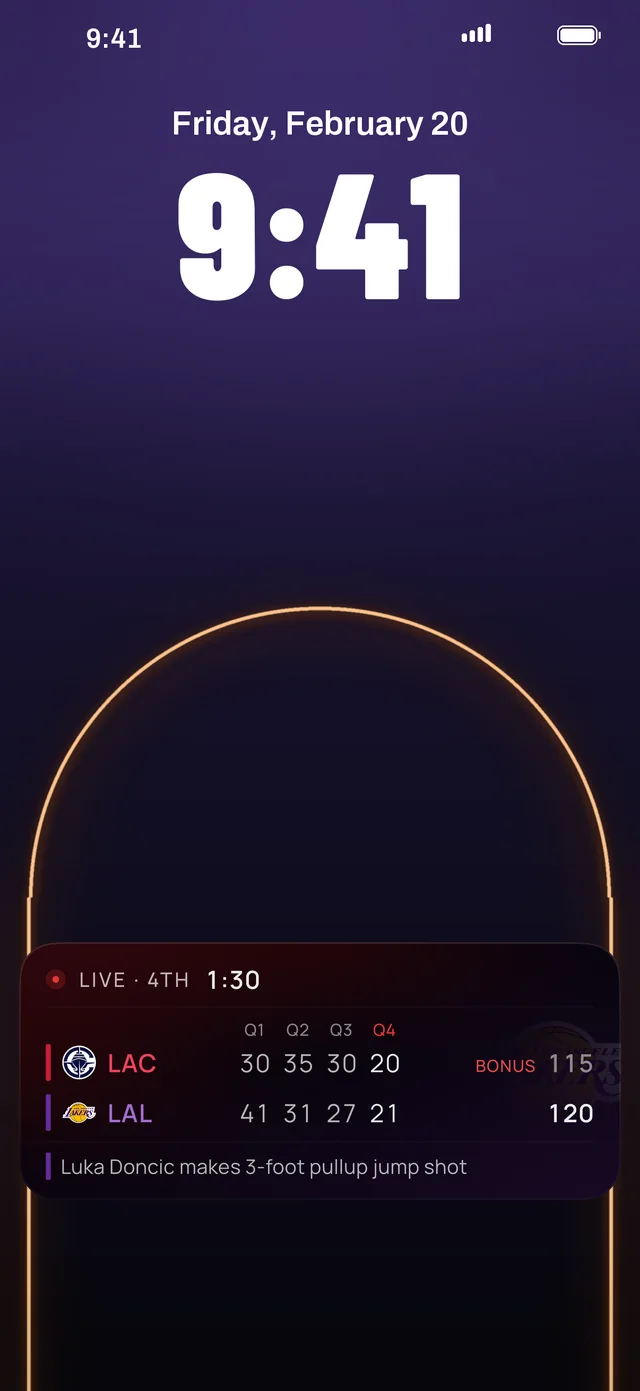
What you see on the Lock Screen
A Live Activity is a live banner that iOS keeps on your Lock Screen and, on iPhones with the Dynamic Island, at the top of the screen while you use other apps. Hoopster's shows:
- The score and the game clock, updating as the game is played
- Points by quarter, including overtime
- The last play, and which team is in the bonus
- The final score when the game ends
Set it up once
- Install Hoopster from the App Store. It needs iOS 26 or later.
- Pick your team when the app opens. You can change it later in Settings.
- In Hoopster, open Settings (the gear on Home). Under Your Team, leave Start automatically on.
- Make sure iOS allows it: open the iPhone Settings app, tap Hoopster and check that Live Activities is on.
That's it. Just before your team tips off, the score appears on your Lock Screen and stays until the final buzzer. There is nothing to add from the Home Screen.
Follow another game, or more teams
To follow any other game, open it in Hoopster and tap Track live. To have more teams start on their own, add them under Live Activity teams in Settings.
Free, and with Hoopster MVP
The Live Activity starts for everyone, with the score free for the first five minutes of every game. With Hoopster MVP ($2.99 a month or $19.99 a year in the US) the score stays for the whole game, for every team you follow.
If it doesn't appear
- Live Activities are off for Hoopster. iPhone Settings, Hoopster, Live Activities.
- Hide scores is on. The Live Activity pauses while scores are hidden, so it can't spoil a game. Turn Hide scores off in Hoopster's Settings to bring it back.
- A Focus is hiding scores. If you set up Hoopster's Focus filter, the Live Activity pauses while that Focus is on and comes back when it ends.
- The game hasn't started. The automatic Live Activity appears just before tip-off, not hours ahead. Between games, the Next Game Lock Screen widget counts down instead.